It was a pretty bad day at CS, I was relly playing like a noob , Well Still i got a nice idea The latency we were getting was nearly 120 and the game was nearly playable, Reasons ??
The data that was being transferred was first going to the proxy server from F hostel and then to the D hostel , so we were traversing two different nw for data transfer.
Solution : if we manage to get a dedicated counter strike server installed and preferably on the proxy server that could solve the problem.
Advantages: The server is up 24*7 (atleast when we are connected to proxy)
The hostel guys can login with the local ip that is 192.168.0.254
and the guys living outside can play with a real ip , so what we have is a real dedicated counter strike server.
Sound easy isn`t it , :) , well it is , But the problem is it`s really difficult to make it official and Convincing strategy would work untill i am in this college , Still i would be giving a try to that , sounds a real great idea and if i want to play with my college guys after my college ends, this is the only way
so let`s pray this happens
Thursday, April 12, 2007

Open Moko
http://wiki.openmoko.org/wiki/FAQ
Q: What is OpenMoko and Neo1973?
A: OpenMoko is a software platform, an attempt to create the world's
first completely open mobile phone software stack. The FIC Neo1973 is
the first fully supported OpenMoko phone.
[edit]
Q: When can I buy a Neo1973?
A: Mid to late April for developers, September for mass market - See
Neo1973 for most up to date information. Neo1973 will be shipped
worldwide. There also will be shipping from EU. To be informed when it
is available, subscribe to the mailing list announce.
[edit]
Q: How much?
A: $350 for the Developer's Kit - Phase 1. Includes:
* Neo1973 phone
* Battery
* Headset
* Compact charger
* Carrying case
* Stylus
* Lanyard
* 512 MB MicroSD card
* USB connectivity cable
* Instruction manual and warranty
$75 for the Car Kit. Includes:
* Windshield mount and device holder
* Car charger
* External antenna
$200 for the Hacker's Lunchbox. Includes:
* Development/Debug Board
* Battery
* Compact charger for development board
* FPC (to connect to the jtag port)
* Shoulder strap
* Debug cable (USB)
[edit]
Q: What will it do?
A: The Phase 1 phone available in early April is for developers only.
It is not suitable for end users, it will have basic functionality as
a touchscreen phone. Little else will work, software development will
continue till mass market release.
Those interested should:
* Know that there will be a device with faster cpu, gsm system
etc. 6 months later
* Have fun hacking devices.
* Be able to find their way through prototype software and
hardware without much documentation.
* Share the dream of a device powered by free software.
* Not expect a consumer-level device.
* Come up with new ideas for exploring the age of mobile computing.
* Have $350.
Ideally they also:
* Can spot bugs and submit patches.
* Love to cooperate with a community improving the software.
Q: What is OpenMoko and Neo1973?
A: OpenMoko is a software platform, an attempt to create the world's
first completely open mobile phone software stack. The FIC Neo1973 is
the first fully supported OpenMoko phone.
[edit]
Q: When can I buy a Neo1973?
A: Mid to late April for developers, September for mass market - See
Neo1973 for most up to date information. Neo1973 will be shipped
worldwide. There also will be shipping from EU. To be informed when it
is available, subscribe to the mailing list announce.
[edit]
Q: How much?
A: $350 for the Developer's Kit - Phase 1. Includes:
* Neo1973 phone
* Battery
* Headset
* Compact charger
* Carrying case
* Stylus
* Lanyard
* 512 MB MicroSD card
* USB connectivity cable
* Instruction manual and warranty
$75 for the Car Kit. Includes:
* Windshield mount and device holder
* Car charger
* External antenna
$200 for the Hacker's Lunchbox. Includes:
* Development/Debug Board
* Battery
* Compact charger for development board
* FPC (to connect to the jtag port)
* Shoulder strap
* Debug cable (USB)
[edit]
Q: What will it do?
A: The Phase 1 phone available in early April is for developers only.
It is not suitable for end users, it will have basic functionality as
a touchscreen phone. Little else will work, software development will
continue till mass market release.
Those interested should:
* Know that there will be a device with faster cpu, gsm system
etc. 6 months later
* Have fun hacking devices.
* Be able to find their way through prototype software and
hardware without much documentation.
* Share the dream of a device powered by free software.
* Not expect a consumer-level device.
* Come up with new ideas for exploring the age of mobile computing.
* Have $350.
Ideally they also:
* Can spot bugs and submit patches.
* Love to cooperate with a community improving the software.
Linux as a multimedia station
In this article i am going to describe how can u use ur own Linux box to convert any format audio to mp3, and that too without violating any copyright laws!!!
what u need?
mplayer //as usual, i always play with it!
lame (lame ain't an mp3 encoder) // but it is
bas!!!
mplayer, i have already described how to get it, and for lame get it from lame.sourceforge.net, it has no dependency.
Now,
The process is divided into 2 stages.
1. Converting ur music to wave. say u have a file called music.wma, let us convert this...
mplayer -ao pcm music.wma
This will produce an output file named audiodump.wav in the same dir
2. Convert this audiodump.wav to mp3, say at bitrate=128
lame -V2 -b 128 audiodump.wav music.mp3
Finished in 30secs approx................
Now the fun part........... Automate the process. I have done that already...
Here is the script..........
> #!/bin/bash
> # call this file convert2mp3
> if [ $# -lt 3 ]
> then
> echo Usage: $0 bitrate input output
> exit
> fi
>
> if [ -f audiodump.wav ]
> then
> echo -n "File named audiodump.wav exists. Remove? (y/n): "
> read x
> if [ $x = "n" ]
> then
> exit
> fi
> fi
>
>
> if [ `mplayer > /dev/null` ]
> then
> echo "Needs mplayer and lame to execute!"
> fi
>
> if [ `lame --help > /dev/null` ]
> then
> echo "Needs lame and mplayer to execute!"
> fi
>
> mplayer $2 -ao pcm
> lame -V2 -b $1 audiodump.wav $3
>
> if [ $? = 0 ]
> then
> echo "Finished Sucessfully!!!"
> fi
>
> rm audiodump.wav -f
what u need?
mplayer //as usual, i always play with it!
lame (lame ain't an mp3 encoder) // but it is
bas!!!
mplayer, i have already described how to get it, and for lame get it from lame.sourceforge.net, it has no dependency.
Now,
The process is divided into 2 stages.
1. Converting ur music to wave. say u have a file called music.wma, let us convert this...
mplayer -ao pcm music.wma
This will produce an output file named audiodump.wav in the same dir
2. Convert this audiodump.wav to mp3, say at bitrate=128
lame -V2 -b 128 audiodump.wav music.mp3
Finished in 30secs approx................
Now the fun part........... Automate the process. I have done that already...
Here is the script..........
> #!/bin/bash
> # call this file convert2mp3
> if [ $# -lt 3 ]
> then
> echo Usage: $0 bitrate input output
> exit
> fi
>
> if [ -f audiodump.wav ]
> then
> echo -n "File named audiodump.wav exists. Remove? (y/n): "
> read x
> if [ $x = "n" ]
> then
> exit
> fi
> fi
>
>
> if [ `mplayer > /dev/null` ]
> then
> echo "Needs mplayer and lame to execute!"
> fi
>
> if [ `lame --help > /dev/null` ]
> then
> echo "Needs lame and mplayer to execute!"
> fi
>
> mplayer $2 -ao pcm
> lame -V2 -b $1 audiodump.wav $3
>
> if [ $? = 0 ]
> then
> echo "Finished Sucessfully!!!"
> fi
>
> rm audiodump.wav -f
Thursday, April 5, 2007
InstallJammer, a self-executing installer for Linux
In the crowded Linux packaging landscape, it would be easy to overlook
Damon Courtney's InstallJammer. However, InstallJammer, which provides
self-executing installers for Linux and other operating systems is
well worth a look. Version 1.1 was released recently with a number of
new features, including support for RPM and Debian package databases,
console-based installs, new platforms, and much more.
InstallJammer creates either GUI or command line installers, and also offers the inclusion of an uninstaller wizard that will be installed aside the program files to allow users to remove the software easily. InstallJammer even supports unattended installation and removal of software.

Damon Courtney's InstallJammer. However, InstallJammer, which provides
self-executing installers for Linux and other operating systems is
well worth a look. Version 1.1 was released recently with a number of
new features, including support for RPM and Debian package databases,
console-based installs, new platforms, and much more.
InstallJammer creates either GUI or command line installers, and also offers the inclusion of an uninstaller wizard that will be installed aside the program files to allow users to remove the software easily. InstallJammer even supports unattended installation and removal of software.
Wednesday, March 7, 2007
Youth for equality is going to fight in MCD elections in Delhi
Friends Y4e has taken a step in order to make this country a better place to live , support them....
Youth For Equality is going to contest the forthcoming MCD Elections in Delhi. After every poosible democratic, nonviolent means of protests to make our voice heard against the Govt's reservation policy, which is having the single point mechanism of increasing vote bank, participating in elcetions is one of the suitable ways to make our voice heard.
So we appeal all the countrymen, who feel to save this nation from further division on caste line and to put an end to the Suppressor and suppressed politics, to come forward and support us in any manner they can, which may help us in going a long way to protect the interest of YFE and the nation as a whole.
Visit our office at C-35, (Behind Mehera Son's Jwellery) South Extension.New Delhi
Anticipating your quick and positive response.
thanks n regards
Nikhil
Youth for Equality
Delhi University
9818552848
9911765750
PS: Bloggers blog it as no posts has been done...
Youth For Equality is going to contest the forthcoming MCD Elections in Delhi. After every poosible democratic, nonviolent means of protests to make our voice heard against the Govt's reservation policy, which is having the single point mechanism of increasing vote bank, participating in elcetions is one of the suitable ways to make our voice heard.
So we appeal all the countrymen, who feel to save this nation from further division on caste line and to put an end to the Suppressor and suppressed politics, to come forward and support us in any manner they can, which may help us in going a long way to protect the interest of YFE and the nation as a whole.
Visit our office at C-35, (Behind Mehera Son's Jwellery) South Extension.New Delhi
Anticipating your quick and positive response.
thanks n regards
Nikhil
Youth for Equality
Delhi University
9818552848
9911765750
PS: Bloggers blog it as no posts has been done...
Algorythm 2007
Algorhythm'07
...the rhythm of technogeeks...
A two day Techno-Cultural Festival - 17th & 18th of March, 2007
Website : http://www.csijmi.com/
Sign on! Algothythm'07 is the Techno-Cultural Festival organised by CSI
Student Branch and Department of Computer Engineering, Jamia Millia Islamia,
New Delhi. Algorhythm'07 takes-off the route to search for talent and
excitement; to give a conglomeration of knowledge, discovery, innovation and
entertainment under one roof, for each one of you. This is the fourth
edition of Algorhythm( the year 2007 ).
Algorhythm'07 is primarily a technical fest with a nice mix of core
technical, fun and cultural events. The events include management, open
source, paper presentation, debate, rock show and lots more. Each year
Algorhythm has been put better and this time its gonna be real big.
Core-Technical Contests:
-------------------------------------------
TUX CODER - Linux / OSS Programming
EUREKA - The Technical Paper Presentation
DESENADOR - PreDesigned Software Contest
HELLO WORLD - On the Spot Algo Design and Programming
ROBOTICS - Robot Design Contest
DA VINCI CODE -The Cryptomania
ED MAX - Engineering Drawing Contest
BRIDGING THE GAP - Bridge construction
More Events/Contests:
-------------------------------------------
MOCK RENDEZVOUS - How well can you speak?
BULLS N BEARS - The Virtual Stock Market
PHOENIX - The Music Mania
ELOQUENCE - The Debate
MAZE TRICKS - The Treasure Hunt
AD MAD SHOW -The Advertising Event
GRAFFITI - Paint Your Imaginations
WHO DARES WINS - One Minute Audience Game Show
GLADIATORZ - Network Gaming Contest
CRUX - General Quiz Contest
For more information:
Website : http://www.csijmi.com/
E-mail : alogrhythm07(at)csijmi(dot)com
...the rhythm of technogeeks...
A two day Techno-Cultural Festival - 17th & 18th of March, 2007
Website : http://www.csijmi.com/
Sign on! Algothythm'07 is the Techno-Cultural Festival organised by CSI
Student Branch and Department of Computer Engineering, Jamia Millia Islamia,
New Delhi. Algorhythm'07 takes-off the route to search for talent and
excitement; to give a conglomeration of knowledge, discovery, innovation and
entertainment under one roof, for each one of you. This is the fourth
edition of Algorhythm( the year 2007 ).
Algorhythm'07 is primarily a technical fest with a nice mix of core
technical, fun and cultural events. The events include management, open
source, paper presentation, debate, rock show and lots more. Each year
Algorhythm has been put better and this time its gonna be real big.
Core-Technical Contests:
-------------------------------------------
TUX CODER - Linux / OSS Programming
EUREKA - The Technical Paper Presentation
DESENADOR - PreDesigned Software Contest
HELLO WORLD - On the Spot Algo Design and Programming
ROBOTICS - Robot Design Contest
DA VINCI CODE -The Cryptomania
ED MAX - Engineering Drawing Contest
BRIDGING THE GAP - Bridge construction
More Events/Contests:
-------------------------------------------
MOCK RENDEZVOUS - How well can you speak?
BULLS N BEARS - The Virtual Stock Market
PHOENIX - The Music Mania
ELOQUENCE - The Debate
MAZE TRICKS - The Treasure Hunt
AD MAD SHOW -The Advertising Event
GRAFFITI - Paint Your Imaginations
WHO DARES WINS - One Minute Audience Game Show
GLADIATORZ - Network Gaming Contest
CRUX - General Quiz Contest
For more information:
Website : http://www.csijmi.com/
E-mail : alogrhythm07(at)csijmi(dot)com
Sunday, February 25, 2007
Building a Gnu/linux Router
Building A Linux Router
By Janne Nurminen
Expert Author
Article Date: 2003-08-06
Building a reliable, full-featured broadband router can be very easy
and cost-efficient. This article is about building one for routing a
LAN to the Internet with NAT (Network Address Translation -- Linux
users also call it as IP Masquerading) using an old computer and a
Linux micro-distribution designed to have very low hardware
requirements. We'll end up having a very simple and stable system, yet
featuring e.g. iptables based stateful firewalling and remote
administration.
My brother had this old IBM Aptiva (which he had found from a trash
can nearby his home) which happened to be just a suitable piece of
hardware for the purpose:
* Pentium 150 Mhz
* 14 Megs of RAM
* 1,6 GB Harddrive
* Disk Drive
* CD-ROM
* 10 Mbps Network Interface Controller
* Soundcard
* Keyboard
* Mouse
* Video Card with 2 MB Memory, integrated to motherboard
* IBM G50 14" Monitor
Choosing a suitable Linux Distribution
The basic idea was to build a router which would also provide firewall
services to protect the internal network, and which could be
administrated remotely. After doing a quick search, I found Coyote
Linux which turned out to be just the perfect solution.
Basically, Coyote Linux is a single floppy distribution of Linux that
is designed for the sole purpose of sharing an Internet connection.
Being a single floppy distribution, it runs off of a single floppy
disk and loads itself to RAM. The floppy itself can be created using
either a Microsoft Windows wizard (!), or by using a set of Linux
shell scripts. I created mine using the latter method.
Since the floppy was all that was needed, I decided to remove all
unnecessary parts from the computer. This makes the machine a bit more
silent and less heat-productive. I removed the hardrive, cd-rom and
souncard, and replaced the old 10 Mbps NIC with two 100 Mbps NICs (the
old one did have a Realtek chip on it, so it would've been supported,
too). Luckily it had just the two needed PCI slots for the two network
cards.
Creating a bootable floppy disk
The next thing to do was to create the boot diskette. I downloaded the
Coyote Linux Floppy Creator Scripts (v1.32) and ran them on my laptop
which runs Linux (yes, indeed do note that to run scripts on Linux you
need a functioning Linux system ;-). The process itself is very
straight-forward. But before you go, you need to know what modules
need to be loaded in order to use your network cards. I used two
identical D-Link cards which use the rtl8139 module. To find out which
module you need, CoyoteLinux has provided a very good documentation,
available in PDF format. Generally, more information can be found from
the Linux Ethernet-Howto and Vendor/Manufacturer/Model Specific
Information.
The script asks to make some trivial choices:
* Please choose the desired capacity for the created floppy (3 choices)
* Please select the processor type in the destination Coyote Linux
system (2 choices)
* Please select the type of Internet connection that your system
uses (1. Standard Ethernet Connection, 2. PPP over Ethernet
Connection, 3. PPP Dialup Connection, 4. ISDN Connection)
* Does your Internet connection get its IP via DHCP? [y/n]
* Install the Road Runner DEC protocol login software) [y/n]
* Install the Big Pond login software? [y/n]
* Do you want to enable the coyote DHCP server) [y/n]
* Would you like to install sshd for secure remote access? [y/n]
* Would you like to install Webadmin for system admin via a web
interface? [y/n]
* Would you like to create another copy of this disk [y/n]?
By default Coyote uses the following settings for the local network interface:
IP Address: 192.168.0.1
Netmask: 255.255.255.0
Broadcast: 192.168.0.255
Network: 192.168.0.0
These don't need to be changed (unless you need a whole lot of
internal IPs, or want to to change the router's internal ip address).
Building the network
The next thing to do was to build the network. I attached a cable from
the modem to the router's Internet network card, and from the router's
local network card to the switch. All other computers were directly
connected to the switch. The result is shown in the fine picture on
the right.
After that I booted the new Linux Router with the newly made boot
disk. Then I adjusted the network settings accordingly for all the
computers connected (c1 - c4).
On Windows: Control Panel -->
Network and Dial-Up Connections
--> Local Area Connection
--> Internet Protocol (TCP/IP):
IP address: 192.168.0.n
Subnet mask: 255.255.255.0
Default gateway: 192.168.0.1
DNS servers: ...
... where n of course needs to be a unique number for each machine (IP
addresses could be obtained also automatically by enabling Coyote
Linux DHCP server for internal network, if needed). On Linux netconf
is a good tool for changing network settings.
http://koti.mbnet.fi/~keiky/misc/linux/router/imgs/ethernet_lan.png
After that I pinged other computers and - being in Finland - Nokia:
[jn@karelia docs]$ ping nokia.com
PING nokia.com (147.243.3.73) 56(84) bytes of data.
64 bytes from www.nokia.com (147.243.3.73): icmp_seq=1 ttl=246 time=48.7 ms
64 bytes from www.nokia.com (147.243.3.73): icmp_seq=2 ttl=246 time=98.9 ms
64 bytes from www.nokia.com (147.243.3.73): icmp_seq=3 ttl=246 time=19.8 ms
--- nokia.com ping statistics ---
3 packets transmitted, 3 received, 0% packet loss, time 2014ms
rtt min/avg/max/mdev = 19.825/55.839/98.974/32.702 ms
and hua! It worked! Next I unplugged the monitor and keyboard from the
router and placed it in its final place.(1
Conclusion
Building a broadband router can be very easy and cost-efficient, and
Coyote Linux Router is a very easy solution for the purpose.
Btw, becase the whole file system is just a RAM disk, the machine can
be shutdown by just pressing the power switch like in the good(?) old
DOS times..
References
1) Next time when booting the router it hung up because of a keyboard
failure (of course I had to remove the router from its Final Place to
be able to plug the monitor back and see what was going on). That was
resolved by changing the proper BIOS setting.
First appeared at http://koti.mbnet.fi/~keiky/misc/linux/router/lnx_router.html
About the Author:
Mr. Nurminen studies Computer Science at the University of Helsinki.
Currently he is working as a software designer for a Finnish company
developing FimX, a professional tool for managing real estate services
(see more: http://www.fimx.net). In his spare time he likes to read
and fiddle with his computers and guitars.
Posted by Rocky at 3:19 AM 0 comments
Saturday, February 24, 2007
By Janne Nurminen
Expert Author
Article Date: 2003-08-06
Building a reliable, full-featured broadband router can be very easy
and cost-efficient. This article is about building one for routing a
LAN to the Internet with NAT (Network Address Translation -- Linux
users also call it as IP Masquerading) using an old computer and a
Linux micro-distribution designed to have very low hardware
requirements. We'll end up having a very simple and stable system, yet
featuring e.g. iptables based stateful firewalling and remote
administration.
My brother had this old IBM Aptiva (which he had found from a trash
can nearby his home) which happened to be just a suitable piece of
hardware for the purpose:
* Pentium 150 Mhz
* 14 Megs of RAM
* 1,6 GB Harddrive
* Disk Drive
* CD-ROM
* 10 Mbps Network Interface Controller
* Soundcard
* Keyboard
* Mouse
* Video Card with 2 MB Memory, integrated to motherboard
* IBM G50 14" Monitor
Choosing a suitable Linux Distribution
The basic idea was to build a router which would also provide firewall
services to protect the internal network, and which could be
administrated remotely. After doing a quick search, I found Coyote
Linux which turned out to be just the perfect solution.
Basically, Coyote Linux is a single floppy distribution of Linux that
is designed for the sole purpose of sharing an Internet connection.
Being a single floppy distribution, it runs off of a single floppy
disk and loads itself to RAM. The floppy itself can be created using
either a Microsoft Windows wizard (!), or by using a set of Linux
shell scripts. I created mine using the latter method.
Since the floppy was all that was needed, I decided to remove all
unnecessary parts from the computer. This makes the machine a bit more
silent and less heat-productive. I removed the hardrive, cd-rom and
souncard, and replaced the old 10 Mbps NIC with two 100 Mbps NICs (the
old one did have a Realtek chip on it, so it would've been supported,
too). Luckily it had just the two needed PCI slots for the two network
cards.
Creating a bootable floppy disk
The next thing to do was to create the boot diskette. I downloaded the
Coyote Linux Floppy Creator Scripts (v1.32) and ran them on my laptop
which runs Linux (yes, indeed do note that to run scripts on Linux you
need a functioning Linux system ;-). The process itself is very
straight-forward. But before you go, you need to know what modules
need to be loaded in order to use your network cards. I used two
identical D-Link cards which use the rtl8139 module. To find out which
module you need, CoyoteLinux has provided a very good documentation,
available in PDF format. Generally, more information can be found from
the Linux Ethernet-Howto and Vendor/Manufacturer/Model Specific
Information.
The script asks to make some trivial choices:
* Please choose the desired capacity for the created floppy (3 choices)
* Please select the processor type in the destination Coyote Linux
system (2 choices)
* Please select the type of Internet connection that your system
uses (1. Standard Ethernet Connection, 2. PPP over Ethernet
Connection, 3. PPP Dialup Connection, 4. ISDN Connection)
* Does your Internet connection get its IP via DHCP? [y/n]
* Install the Road Runner DEC protocol login software) [y/n]
* Install the Big Pond login software? [y/n]
* Do you want to enable the coyote DHCP server) [y/n]
* Would you like to install sshd for secure remote access? [y/n]
* Would you like to install Webadmin for system admin via a web
interface? [y/n]
* Would you like to create another copy of this disk [y/n]?
By default Coyote uses the following settings for the local network interface:
IP Address: 192.168.0.1
Netmask: 255.255.255.0
Broadcast: 192.168.0.255
Network: 192.168.0.0
These don't need to be changed (unless you need a whole lot of
internal IPs, or want to to change the router's internal ip address).
Building the network
The next thing to do was to build the network. I attached a cable from
the modem to the router's Internet network card, and from the router's
local network card to the switch. All other computers were directly
connected to the switch. The result is shown in the fine picture on
the right.
After that I booted the new Linux Router with the newly made boot
disk. Then I adjusted the network settings accordingly for all the
computers connected (c1 - c4).
On Windows: Control Panel -->
Network and Dial-Up Connections
--> Local Area Connection
--> Internet Protocol (TCP/IP):
IP address: 192.168.0.n
Subnet mask: 255.255.255.0
Default gateway: 192.168.0.1
DNS servers: ...
... where n of course needs to be a unique number for each machine (IP
addresses could be obtained also automatically by enabling Coyote
Linux DHCP server for internal network, if needed). On Linux netconf
is a good tool for changing network settings.
http://koti.mbnet.fi/~keiky/misc/linux/router/imgs/ethernet_lan.png
After that I pinged other computers and - being in Finland - Nokia:
[jn@karelia docs]$ ping nokia.com
PING nokia.com (147.243.3.73) 56(84) bytes of data.
64 bytes from www.nokia.com (147.243.3.73): icmp_seq=1 ttl=246 time=48.7 ms
64 bytes from www.nokia.com (147.243.3.73): icmp_seq=2 ttl=246 time=98.9 ms
64 bytes from www.nokia.com (147.243.3.73): icmp_seq=3 ttl=246 time=19.8 ms
--- nokia.com ping statistics ---
3 packets transmitted, 3 received, 0% packet loss, time 2014ms
rtt min/avg/max/mdev = 19.825/55.839/98.974/32.702 ms
and hua! It worked! Next I unplugged the monitor and keyboard from the
router and placed it in its final place.(1
Conclusion
Building a broadband router can be very easy and cost-efficient, and
Coyote Linux Router is a very easy solution for the purpose.
Btw, becase the whole file system is just a RAM disk, the machine can
be shutdown by just pressing the power switch like in the good(?) old
DOS times..
References
1) Next time when booting the router it hung up because of a keyboard
failure (of course I had to remove the router from its Final Place to
be able to plug the monitor back and see what was going on). That was
resolved by changing the proper BIOS setting.
First appeared at http://koti.mbnet.fi/~keiky/misc/linux/router/lnx_router.html
About the Author:
Mr. Nurminen studies Computer Science at the University of Helsinki.
Currently he is working as a software designer for a Finnish company
developing FimX, a professional tool for managing real estate services
(see more: http://www.fimx.net). In his spare time he likes to read
and fiddle with his computers and guitars.
Posted by Rocky at 3:19 AM 0 comments
Saturday, February 24, 2007
Friday, February 23, 2007
Why Vista Sucks
Vista which was suppose to be more secure, more reliable, easy to use, (showered with all the nice marketing terminologies) is already showing its true colors.
It has a serious security flow that allows any application to play with the core kernel, this is potentially dangerous as someone can use this to write a virus, put a trojan, infect your pc with a spyware and create all kinds of havoc. Read more.
The blog world is filled with how insecure Vista is. Some more interesting reading. BBC says:
Microsoft has admitted that speech recognition features in Vista could be hijacked so that a PC tells itself to delete files or folders.
Forbes.com screams: More than five years in the making, more than 50 million lines of code …. Vista is at best mildly annoying and at worst makes you want to rush to Redmond, Wash. and rip somebody’s liver out.
Please don’t do anything like ripping anyones liver. Just rip out Vista and put Linux :)
It has a serious security flow that allows any application to play with the core kernel, this is potentially dangerous as someone can use this to write a virus, put a trojan, infect your pc with a spyware and create all kinds of havoc. Read more.
The blog world is filled with how insecure Vista is. Some more interesting reading. BBC says:
Microsoft has admitted that speech recognition features in Vista could be hijacked so that a PC tells itself to delete files or folders.
Forbes.com screams: More than five years in the making, more than 50 million lines of code …. Vista is at best mildly annoying and at worst makes you want to rush to Redmond, Wash. and rip somebody’s liver out.
Please don’t do anything like ripping anyones liver. Just rip out Vista and put Linux :)
Monday, February 12, 2007
ShowMeDo ... learning by seeing
http://showmedo.com/
Welcome to ShowMeDo! This site is dedicated to showing demonstrative
videos produced by our community. For many subjects seeing something
done is the most effective way to learn, whether it's peering over an
expert's shoulder while they explain how to program or watching while
someone grinds beans and makes coffee. Please watch, learn and perhaps
share your knowledge back. http://showmedo.com/
Videos on:
* Python
* Java
* Linux
* Ruby
* Blender
* Graphics
* Screencasting
* Others
Welcome to ShowMeDo! This site is dedicated to showing demonstrative
videos produced by our community. For many subjects seeing something
done is the most effective way to learn, whether it's peering over an
expert's shoulder while they explain how to program or watching while
someone grinds beans and makes coffee. Please watch, learn and perhaps
share your knowledge back. http://showmedo.com/
Videos on:
* Python
* Java
* Linux
* Ruby
* Blender
* Graphics
* Screencasting
* Others
Goa Education Development Corporation... GNU/Linux courses
Goa Education Development Corporation is offering some
GNU/Linux course.
http://gedc.nic.in/CC_Linux.php
Linux is a UNIX-like operating system that has gained popularity as it
is used as a replacement for Windows and is available for free. Linux
is quite reliable and seldom crashes. Its source code is available in
the public domain and anyone with programming knowledge can modify it
to enhance its features. The Government of India itself plans to adopt
Linux, thereby bringing down the cost of ownership of IT
infrastructure.
Course Contents
Basic Linux
Linux file system, Kernel , Shell, Linux user interface, Creating,
copying and deleting files, Printing, Typical Linux Applications
Advanced Linux
Linux Installation and Configuration, Linux variants, Command-line
Commands and customization, Managing user accounts, Creating and
mounting file systems, Setting up LANs, Connecting to the Internet,
Networking with Windows, Installation of Mail, FTP and Proxy servers
Course Pre-Requisites
Participant should know basics of computing
Who Should Attend?
Learning Linux is recommended for those working in Offices where Linux
is likely to be installed.
Duration:
Basic Linux: 2 Weeks
Advance Linux: 2 Weeks
Course Fees :
Basic Linux: Rs 1500
Advance Linux: Rs 2000
GNU/Linux course.
http://gedc.nic.in/CC_Linux.php
Linux is a UNIX-like operating system that has gained popularity as it
is used as a replacement for Windows and is available for free. Linux
is quite reliable and seldom crashes. Its source code is available in
the public domain and anyone with programming knowledge can modify it
to enhance its features. The Government of India itself plans to adopt
Linux, thereby bringing down the cost of ownership of IT
infrastructure.
Course Contents
Basic Linux
Linux file system, Kernel , Shell, Linux user interface, Creating,
copying and deleting files, Printing, Typical Linux Applications
Advanced Linux
Linux Installation and Configuration, Linux variants, Command-line
Commands and customization, Managing user accounts, Creating and
mounting file systems, Setting up LANs, Connecting to the Internet,
Networking with Windows, Installation of Mail, FTP and Proxy servers
Course Pre-Requisites
Participant should know basics of computing
Who Should Attend?
Learning Linux is recommended for those working in Offices where Linux
is likely to be installed.
Duration:
Basic Linux: 2 Weeks
Advance Linux: 2 Weeks
Course Fees :
Basic Linux: Rs 1500
Advance Linux: Rs 2000
Vote India for OpenOffice Conference
Dear All,
You are requested to vote for Dehradun , India as preferred OpenOffice conference-2007 location. The other two contenders for the same are:-
• Barcelona , Spain
• Beijing , China
All voters will be invited to attend the conference, in case India Win !
The last date is 15-Feb-2007
How to Vote for India :-
Step 1. Please do register yourself at:
http://www.openoffice.org/servlets/Join
Step 2 Now Vote :-
http://marketing.openoffice.org/ooocon2007/proposal.html
Step 3 Now you will recieve a mail to confirm your vote.
Note: In case, link is not opening in your browser, kindly cut and paste the link in the browser.
Thanks
Regards
You are requested to vote for Dehradun , India as preferred OpenOffice conference-2007 location. The other two contenders for the same are:-
• Barcelona , Spain
• Beijing , China
All voters will be invited to attend the conference, in case India Win !
The last date is 15-Feb-2007
How to Vote for India :-
Step 1. Please do register yourself at:
http://www.openoffice.org/servlets/Join
Step 2 Now Vote :-
http://marketing.openoffice.org/ooocon2007/proposal.html
Step 3 Now you will recieve a mail to confirm your vote.
Note: In case, link is not opening in your browser, kindly cut and paste the link in the browser.
Thanks
Regards
Thursday, January 18, 2007
WikiMapia -- An excellent Example of Community
Wiki were the Best thing after Tea, Which is easily shown By one of the most popular site on internet Wikipedia.
Today in open Source World Almost all Documentation is done through Wiki, My favorite one is Ubuntu Wiki.
And What happen when a marvelous technology from Google and Community Comes Together. WIkiMapia is the Online Version Of the Masterpiece Google Earth, (BTW google earth is Available on Linux too, Read here)
Here`s a screenshot
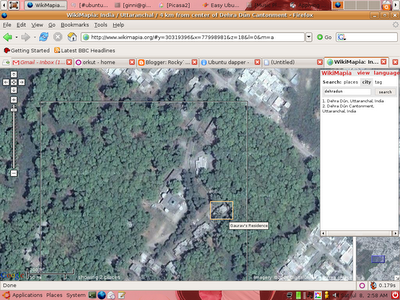
It`s nice to see it says the Exact Location From Main area On the Title bar
WikiMapia rightly says Let`s describe the whole Earth.
Today in open Source World Almost all Documentation is done through Wiki, My favorite one is Ubuntu Wiki.
And What happen when a marvelous technology from Google and Community Comes Together. WIkiMapia is the Online Version Of the Masterpiece Google Earth, (BTW google earth is Available on Linux too, Read here)
Here`s a screenshot

It`s nice to see it says the Exact Location From Main area On the Title bar
WikiMapia rightly says Let`s describe the whole Earth.
Shabdanjali the Hindi Dictionary
I saw the Shabadanjali Dictionary while working with Shashi Palekar ji on her Paper on MultiLigual Dictionaries.But it was ISCII based and requires a plugin to display the characters which is never a good idea. Unicode rocks and should be a standard application.
While surfing i found shabdkosh.com and the Unicode version of shabdanjali for windows, which can be easily implemented with Linux.
For Installing the dictionary just Use
#sudo apt-get install stardict
and extract the files in /usr/share/stardict/dic.
While surfing i found shabdkosh.com and the Unicode version of shabdanjali for windows, which can be easily implemented with Linux.
For Installing the dictionary just Use
#sudo apt-get install stardict
and extract the files in /usr/share/stardict/dic.
Linux Installfest@RKGIT
Get All You Want in Jagriti-2007...!!
Stall Name :- Linux InstallFest
Base Idea:- Free Installing Linux Distribution on PC and Configuring it for user
Introduction :- An InstallFest is an event, Co-ordinated by Ghaziabad
Linux User Group and RKGIT, at which people get together to do mass/Free
installations of Linux OS other open source software.
It is an advocacy and community-building event, where
novices bring their computers along and experienced users help them
in Installation and troubleshooting problems.
InstallFest welcome all skill levels from complete novice
to expert.
Purpose:- Helping Users from all NCR To Install the Linux OS on there
PC`s.
Resources :-
www.installfest.org
RULES AND REGULATIONS:
1.Each participant need to register first either on spot or on website.
2.It is open to everyone.
3.Users needed to bring PC for Installing the Operating System on their PC
4.Certificates will be awarded for participation.
5. Lug Membership option will be provided
Address:

Rendezvous@ Jagriti:- RAJ KUMAR GOEL INSTITUTE OF TECHNOLOGY
5 Km. Stone (Opp. Jain Tube Co. Ltd.)
Delhi-Meerut Road, Ghaziabad, India
honeytech@gmail.com
Detail Will Be Updated Soon..!!
Stall Name :- Linux InstallFest
Base Idea:- Free Installing Linux Distribution on PC and Configuring it for user
Introduction :- An InstallFest is an event, Co-ordinated by Ghaziabad
Linux User Group and RKGIT, at which people get together to do mass/Free
installations of Linux OS other open source software.
It is an advocacy and community-building event, where
novices bring their computers along and experienced users help them
in Installation and troubleshooting problems.
InstallFest welcome all skill levels from complete novice
to expert.
Purpose:- Helping Users from all NCR To Install the Linux OS on there
PC`s.
Resources :-
www.installfest.org
RULES AND REGULATIONS:
1.Each participant need to register first either on spot or on website.
2.It is open to everyone.
3.Users needed to bring PC for Installing the Operating System on their PC
4.Certificates will be awarded for participation.
5. Lug Membership option will be provided
Address:

Rendezvous@ Jagriti:- RAJ KUMAR GOEL INSTITUTE OF TECHNOLOGY
5 Km. Stone (Opp. Jain Tube Co. Ltd.)
Delhi-Meerut Road, Ghaziabad, India
honeytech@gmail.com
Detail Will Be Updated Soon..!!
So here i start my Tech Blog
I have been bugged by my Fellow people and Juniors several time to write everything which i do, But since i am one of the most lazy guy in the world(atleast a contender). I never tried even.
But now i feel Documentation is a good thing for any coder, so here i am starting my technical Blog, My Previous blog http://rockybhai.blogspot.com is there and will remain a mirror of my life always
But now i feel Documentation is a good thing for any coder, so here i am starting my technical Blog, My Previous blog http://rockybhai.blogspot.com is there and will remain a mirror of my life always
Subscribe to:
Posts (Atom)

